


 This is a long, drawn-out entry which will probably not appeal to very many people (though, there are pretty pictures, so maybe that will entertain some?). In the text that follows, I feebly analyze icon images and come to the conclusion that Adobe sucks ass when it comes to crafting an icon that's worth a crap (I could say the same about their bug-ridden applications, but we'll save that for another time). I am not a computer interface expert. I am not a human useability analyst. I am not even remotely knowledgeable about how the human brain associated an image with an item. But lack of credentials has never stopped me from stating my opinion in the past, and I'm certainly not going to let it stop me now.
You've been warned. To continue reading, click on the link below...

The reference standard for icons on the Macintosh come from, who else, Apple. The majority of icons they use are distinctive, attempt to indicate the function of the application, and look wonderful. The only problem is that they assume knowledge some people may not possess. Safari, Apple's web browser is a compass, which makes perfect sense when you consider a browser's function is to assist you in navigating the web, but assumes you know what a compass is (let's face it, in this day of GPS devices, MapQuest, and the decline of the Boy Scouts, this is old-school). Preview, allows you to view images (and even PDFs) so it's icon is great if you know what a photographer's magnifying loupe is. Sherlock, Apple's web search utility, is beautifully illustrated in icon and name, assuming you know who Sherlock Holmes is and the type of hat he wears (though the magnifying glass is pretty academic). Mail (email reader), iTunes (digital music manager and CD player), and iPhoto (digital photo and camera manager) are all a little more accessible because everybody who finds themselves using a computer probably is in a position to knows what a stamp, a CD, and a camera looks like. So, when it comes to icons, Apple is pretty much the cat's meow, though they are not entirely perfect...

In some cases, Apple's presumption of knowledge goes a little too far (usually in their utility applications). For example, Disk Utility assumes you know what a hard drive looks like, which is odd because many, many users will never look inside their computer to find out (especially with a company like Apple, who works so hard to be sure you never have to look inside your machine). The only thing that saves them from total obscurity this time is that the default icon for a hard drive is the exact same, so most people should be able to put 2 and 2 together. They don't have such an excuse for System Profiler, which assumes you know what a computer chip looks like (probably not a very big leap) and then compounds it with an esoteric tool like a calliper. Things go down hill from there with ODBC Administrator but, in their defense, if you would actually need to use it, you are probably familiar with the universal symbol for a database. Not all implied references are technical. Apple's Backup software uses an umbrella, which relies entirely on a familiarity with the saying "into every life, a little rain must fall" and what is meant by it. Font Book is perfectly rendered and easily understood, but how many people in newer generations are going to know about the origins of moveable type and what those scattered letters mean? But "meaning" of an icon is subjective, and Microsoft weighs in with a widely used alternative...
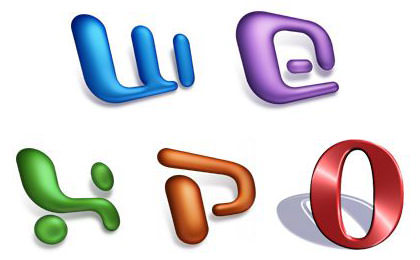
Instead of attempting to reflect function or form, Microsoft simply provides a stylized icon from the first letter from the name of each product. While not my favorite method of identifying an app, it does have the benefit of immediate association. So, I suppose if your method of rendering the letter is distinct enough, you can get away with it. There's really no mistaking these bizarre renditions for Word, Entourage, Excel, and Powerpoint. Where you run into trouble is when you just slap some generic looking letter on your icon, like the kinda lame "O" for the Opera web browser, which is painfully easy to overlook or misinterpret. And here's where we get to the entire point of this entry. The icon travesty from Adobe...
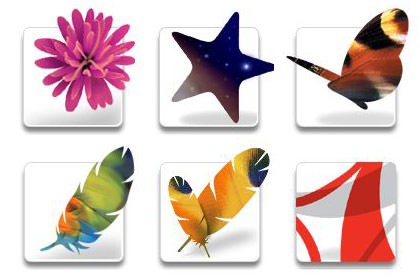
What the f#@%?!?
Seriously, I defy you to show these icons to anybody not already familiar with Adobe's latest round of "CS" products and have them comprehend what the associated application does, what it's named, or even what it's supposed to be. Adobe, the premiere manufacturer of graphic design software has the absolute worst icons of any professional software I've ever seen. Here are my guesses as to what software these icons might actually be useful for:
It was that last one, the icon for Adobe's newly-released Adobe Reader (formerly known as Acrobat Reader) which I just downloaded that caused me to become enraged and write all of this. I can only guess that it is supposed to be a stylized version of the old "Acrobat" logo, but they've presented in a way which is impossible to know that, even if you've seen the logo before!! Adobe icons are stupid, stupid, stupid and, even though I've been using the programs for over a year now, I STILL get the icons mixed up on occasion. I wish I had a dollar for every time I accidentally confused the icons for InDesign and GoLive and opened the wrong program.
Whoever approved these icons should be shot. I'm sure they are supposed to be some kind of abstract artistic statement, but f#@% you, I just want to get to work and be able to launch the program I need without having to figure out what in the heck I am actually clicking on. Adobe is a multi-million dollar company, but it doesn't take that kind of money to make functional icons.
The following are all icons from developers who at least try to make an icon that is intuitive. Not all of them are perfect, but the effort in giving us something logical is much appreciated...


This is not an exhaustive list. There are plenty of other icons I think are brilliant, and a whole lot more I think are really, really bad (though nothing actually useable ever seems to sink to Adobe-level depths of crap). I guess the entire point of this entry is that icons matter. Having icons that are distinctive or relate to the program in some way is essential. Shame on Adobe for screwing up something so basic so very badly when even tiny freeware developers put forth more of an effort to get it right. If the new, even more confusing Adobe Reader icon is any indication of what we'll be seeing from the next CS Suite release, I'll be trashing them and designing my own.

I love comments! However, all comments are moderated, and won't appear until approved. Are you an abusive troll with nothing to contribute? Don't bother. Selling something? Don't bother. Spam linking? Don't bother.
PLEASE NOTE: My comment-spam protection requires JavaScript... if you have it turned off or are using a mobile device without JavaScript, commenting won't work. Sorry.
 Atom Entries Feed Comments Feed








I couldn’t agree less. But you Macintoshians/Appleans are way more fortunate than us Windows users. The Adobe icons are as non-descriptive here too, but the overall lack of inventiveness in Windows icons are way bigger than that of Apple/OS X icons. I think it has to do with the color support and the fact that the icons are relatively small. Windows isn’t for the graphics buff, it’s for the hard core gamer…
I use Adobe’s Creative Suite on a daily basis, but I would be totally lost if it weren’t for the fact that the application’s name is written just beside the icon in the Start menu.
It would be rather interesting to have a “Native American Indian tribe historic migration software”. Really. I kid you not! 😀
I believe such software actually exists (at least, I saw it in use on a television documentary). The seasonal movement and tribal land claims of the Native American nations affords a fascinating insight into their culture, and reliance on migration routes of buffalo, whale, etc. To view such a simulation in in motion, over time from a historical perspective… along with their ever-shrinking territories as their land was taken or tribes wiped out… is both fascinating and heartbreaking.
How do you draw your clever pictures? Are they done with pre-set patterns/shapes or freehand…or maybe some of both? I enjoy them.
If you are talking about the “DaveToons” that are at the top of all my blog pages here, I draw them freehand in Adobe Illustrator. If you are talking about the icons shown in the above entry, those are not drawn by me but are created by the companies or individuals who develop the software they’re associated with.
Those ‘dobe icons are screwy, as you mentioned, they make no sense, and thus we can conclude they where made by aliens to confuse and bewilder us all.
I think the average user becomes familiar with icons by familiarisation mostly, as opposed to recognising any intrinsic symbolism (“ohhh – blue e. Thar be my internet thing.”)
On the whole though, you should think yourself lucky, Mac icons are mostly superior to windows icons, although XP (bless its heart) did improve things.
(Really digging the new site design, by the way – well done!)
I totally agree with you on the Adobe Reader icon. I upgraded to version 7 for Windows yesterday and it uses the same icon on the Windows platform. The old icon was a bit more descriptive, that just looks just, well, stupid. They’re pretty but somewhat disfunctional.
Thanks for the kind words about the PodWorks icon. It was actually done by Dave Brasgalla of IconFactory (who also did the Transmit icon, for example). Definitely one of the undisputed masters of OS X icon design.
A little bit of history on that transit vs. transmit bit you are mentioning…
Buzz: Any praise for Podworks is well deserved… and not just the icon. I don’t think I’ve ever registered a program so fast after having downloaded it just minutes before! I completely agree that Icon Factory is the poster child for excellence in Icon Design. I have been a big fan since the Classic MacOS days, and still marvel at how they seem to so effortlessly communicate form and function in their works.
Martin: Ah yes… The Coding Monkeys, home of the very impressive collaborative text editor: SubEthaEdit (which has a praise-worthy, intuitive, and brilliant icon as well). Thanks for the head’s-up on Transmit. I figured it was probably some kind of legal entanglement like that.
I think you’re not harsh enough.
You should also judge the icons by their look at reduced sizes as those are the sizes you mostly see them in. Many of the ‘nice details’ will just look like blobs or swashes of colour then.
I use most of my icons at 48×48, which seems to preserve the detail level enough to keep them distinct. Any smaller, and you are correct, they start to fall apart as far as recognition goes. I suppose if you go really small, you could always switch to list view, where the icons are secondary?
You know, I’ve always had a bit of bone to pick with the identity Adobe has chosen, but you really nailed it! What do feathers have to do with Photoshop? Or flowers with Illustrator? It’s random, and not Monte Python funny random, just random.
One group you didn’t mention is Macromedia, circles with the stylized first letter of the app. It will be interesting to see where Adobe takes Macromedia’s icons…
Oh I’m sure that we’ll get honey bees for Dreamweaver, a water drop for Cold Fusion, a lizard for Flash, and everything else will be discontinued. If not that, then something equally obtuse and confusing!
Aww… no offense, but quit whining! 😉 It’s sooooo easy to replace the icons with any of the many freely available replacement icons. Just google for ’em.
An even better solution (for OS X anyway) is to just use the incredible QuickSilver and never have to rely on icons for launching apps again. You could even use Spotlight, which is similar but not quite as fast as QuickSilver.
Uhhhh… it’s my blog. Whining is what I DO here! 🙂
Seriously though, icons serve a purpose for those of us who don’t want to use QuickSilver… and I don’t think it’s whining to request that companies give us icons that don’t suck ass, and help to identify the application in question.
I remember when Adobe’s icons were meaningful – a framed photo with glass for photoshop, vector drawing (if you looked closely) for illustrator… keeping them similar with just a minor gloss-tweak each version allowed us to imprint them in all the pre-CS versions.
The total change to meaninglessness in CS was terrible. I still remind myself – photoshop – click the feather – every time I open it. They’ve made a slightly-too-big a change again in CS2, though the intuitive leap is more manageable this time.
This guy seems to like them…
http://www.stanleysy.com/blog/2005/04/07/adobe-cs2-iconography/
His MetaDesign-guy quote about CS-icon reasoning and attempt to link them to the previous set is amusing out-of-touch designer-speak and worth repeating:
“Nature provided a good metaphor for the role of design software… Feathers were one of the original drawing/illustrating tools. Stars were the original navigation technology. Flowers are present in the original Venus painting. Butterflies were already established in the InDesign packaging, so they already fit the scheme.”
So… how come the feather is photoshop and not illustrator, then? Oh, because if you look real close at the earlier illustrator box, there are some flowers. The new set clearly do belong together in the suite, but they’re too meaningless. Change is OK once in a while (there really wan’t much more they could do to venus) – but icons need to connect to their application’s purpose.
Esoteric symbology may be pretty and meaningful in a round-about way… but they are crap for doing what an icon is supposed to do: easily identify the program. Flowers, feathers, butterflies, and starfish in absolutely NO way identify drawing, photography, layout, or web design. In this respect, Adobe’s icons fail totally.
I’m not saying that the old icons were all that much better, but they had the benefit of growing with the program. The Illustrator icon came from early Illustrator packaging where “The Birth of Venus” was being converted into a vector drawing. As Illustrator’s tools got better, the drawing kept getting better. In the last iteration, a near-perfect rendering of Venus didn’t have anything to do with drawing, but for somebody like me who had grown with what the icon originally represented, it was okay.
The simple fact is that Adobe had the perfect opportunity to fix their icons when they created CS, and completely blew it. Why they didn’t use the tools from each program as an easily-identifiable starting point for new icons I will never know.
The feather for Photoshop is probably representing a quill (I DON’T know what a quill has to do with photo manipulation, but it connects in a sort of abstract way). Same with ImageReady, it probably is trying to show the connection to Photoshop. As for GoLive, the stars are showing the Web/internet (again, in a very absract manner). The Adobe reader icon is a flag with an abstract (again) A, for Adobe, or Acrobat. The InDesign logo still boggles me however…
Anyway, I think the CS icons are OK, as long as you don’t put them under the microscope and examine them too closely. The point is to be artistic (remember, it IS the CREATIVE Suite). I think that Apple’s photoreallistic icons are superb. My two favorites are the Audio MIDI setup (a keyboard), and the Network (a radar screen) utilities.
Sorry, just saw this post for the first time when a comment notification appeared for your site in Bloglines (yeah, so I subscribe to your comments feed… what of it?).
There’s an icon I love for Palm OS for a little piece of embedded software that sends your files to your Palm the next time you sync up. The icon shows a little box with a music note and another below it that looks like a Polaroid image and a little curled arrow showing both moving towards an old Palm Pilot image. Very intuitive, very simple, very effective.
I’m surprised you didn’t feature the Thunderbird icon. But, I guess it’s already pretty similar enough to the other Mozilla icon for Firefox that you lauded.
Oh, and I had no idea that was a magnifying loupe on the Preview icon. I actually thought it was a thumbtack sticking a couple photos to a pinboard or somesuch. Now it makes even more sense. Thanks!
There just icons you associate them with there programs thats it, it only takes what?, 3 days to know all of your icons and what they open. I do agree that some of the icons are misrepresentative of the app they open but still thats nothing to get annoyed about.
Associate them how? THEY ALL LOOK THE SAME! And it’s not like you can tell what they do from their look… extremely poor design for all the reasons I listed above.
You forgot to write – an important point – about FireFox; the fire surrounding the globe is actually in shape of a FOX.
I completely agree. The icons give NO indication as to what their programs’ functions are, AND they all look relatively similar. Furthermore, they all completely trash the icons that were used pre-CS, so you lose that familiarity.
And to make matters worse, there’s CS2. Where they essentially made different icons for all the apps, in the same style as CS. So now you have a NEW batch of vague icons and you have to re-learn what each one is all over again.
Thanks for validating one of my daily annoyances…those ridiculous Creative Suite icons (and what’s with that whole feather thing?). I’ve never verbalized it, but yes, it takes a moment to be sure I am opening the right app. Too bad Adobe doesn’t see the value in “branding” even at the most basic level.
However, I strongly disagree with you that Apple’s “assumption of knowledge that people may not have” is a problem. Their references are quite clever and if you didn’t get it before, you get it now and just learned something. I find it unfortunate and sad that literacy has come to mean “only what applies to me now”…and really, who doesn’t know what kind of hat Sherlock wore?
Love your page and this was fun…thanks!
the only thing you missed about adobe icons is that once you know them, they make sense. th feather for photoshop is bueatifully cropped to show both the feather outline and an iridecent flower thingy inside it. It shows what you can do in photoshop.
illustrator has a flower which repersents the edges of vector art
indesign has a butterfly to show the versatility and agility of the application, as well as the paper-thin wings
golive has a star to show the internet, commonly repersented as an earth, and your website is a star
the double feather thingy is like a mini-photoshop
adobe reader has a symbol, and it’s stylized to show the newness of the new version.
cs2 redesigned the icons so they’re even more… weird… but good-looking.
james
Actually, as I explained, they make no sense at all to me.
Illustrator is a flower? What’s a flower got to do with drawing? Why not play up the pen tool. Photoshop is a feather? What’s a feather got to do with photo manipulation? Why not play up the brush tool or something.
The worst offense is not trying to attach meaning to the icons… it’s that they are too easily confused. I get them mixed up all the time, even though I know what apps they go to.
1. “a water drop for Cold Fusion” -> isn’t that kind of the idea? That would work, especially into a glass, with flames/steam coming out…
2. You hated the new Acrobat icon most — that was the only one I recognized!! Granted, only b/c you’re talking about Adobe icons…
3. Wow, how many years has this blog thread been running?? KUDOS!!
4. No ranting about the word “kudos”
Lol. Imma design dabbler myself but I totally feel ya on the Adobe tip. I must admit that the only way for me to differentiate Photoshop from Illustrator is to put them at separate ends of my dock. Might I add that’s flower vs feather. And yes- the Fetch icon rocks out. Not only is the concept great, but it “runs” as well when you’re up/dl’ing files.
Btw, can you recommend a good forum/meeting hall where more of this constructive crit for logos/icons takes place? Thanks!
p.s. Ditto on the longest running thread EVER.
Lol. Imma design dabbler myself but I totally feel ya on the Adobe tip. I must admit that the only way for me to differentiate Photoshop from Illustrator is to put them at separate ends of my dock. Might I add that’s flower vs feather. And yes- the Fetch icon rocks out. Not only is the concept great, but it “runs” as well when you’re up/dl’ing files.
Btw, can you recommend a good forum/meeting hall where more of this constructive crit for logos/icons takes place? Thanks!
p.s. Ditto on the longest running thread EVER.
Couldn’t agree with you more Dave. As someone who has been using Adobe software since Photoshop 2.5 shipped on floppies, the one thing lost over the years has been the symbolism of icons to their respective applications.
For years the vector Venus meant illustrator, and the framed eye meant Photoshop. Now I try to remember what the feathers, flowers and butterflies are all about.
Microsoft’s icons are only meaningful because of their dominance as known office applications. Otherwise, the first initials wouldn’t make any sense. Still, I personally would prefer more meaningful symbols, lest everything one day be reduced to first initial icons.
I’m sure as a Mac user you’ve probably been there, but I’m a fan of iconfactory.com, which compliments your thoughts on this topic. I particularly like the various “Aqua Series” of icons that they created in the spirit of Apple’s original designs.
Cool & original blog!